Build connections with Bluebeamers around the world, discover what’s new, and make your voice heard.
While marking up drawings, I often find myself using the same tool over and over again. Each time I start the tool, the color reverts back to red. It would be nice if it remembered the previous color/if other settings changed
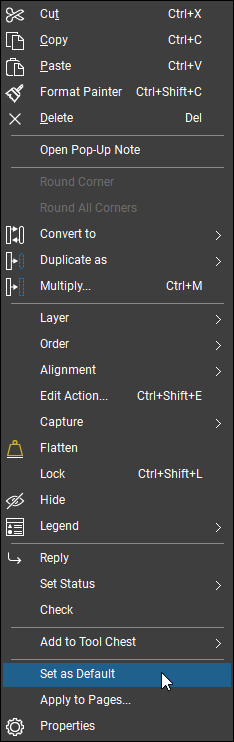
@lschubert, Bluebeam relies on user defaults. You can set any tool the way you want by right clicking it and selecting “Set as Default.”
If you find yourself constantly adjusting colors or similar settings, use the Tool Chest and save individual markups there. That will keep your colors consistent and save time.
Hope this helps!
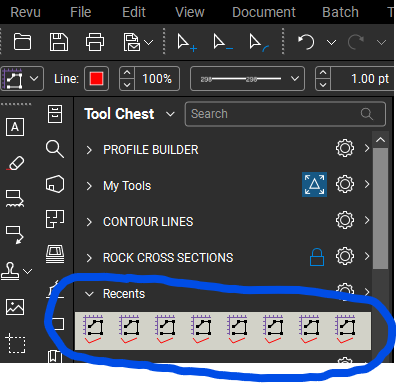
In addition to @Shaya Birnbaum's suggestion @lschubert you could work from your "Recents" toolchest:
Another thought would be to create custom tools that match the settings that you regularly use.
Hope this helps. 😎
Good point @David Cutler.
You may want to learn about creating a Custom Tool Chest
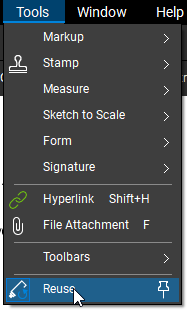
There's also the Reuse option you can enable if you're using the same markup tool multiple times in succession.
I believe that you have to also save your profile after changes like this are made so it sticks the next time you open the program.
Custom tool chests are fantastic. You can save any markups you make to be re-used later (text, linework, snapshots). I recently learned how to use properties mode: create a markup like text, linework, callout, etc. then right-click, "add to tool chest". Right-click on the new tool chest button, and select "Properties Mode". "Drawing Mode" places a markup identical to the one that was placed (i.e. the text note or exact linework), whereas "Properties Mode" starts the drawing command that was used (i.e. Text Box, or Callout) with all the properties the same as the source object.
And you can export tool chests to files that can be shared with other users.