Build connections with Bluebeamers around the world, discover what’s new, and make your voice heard.
One of the most tedious things to do is to create page labels every time. They are in the same place on the sheet… Unless im unaware of this. Seems like a simple batch script could be setup to allow this. Sheet Number - Sheet Name.
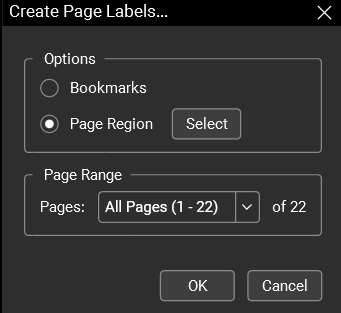
There's a workflow for this in Revu Complete: 1) Create Page Labels by Page Region
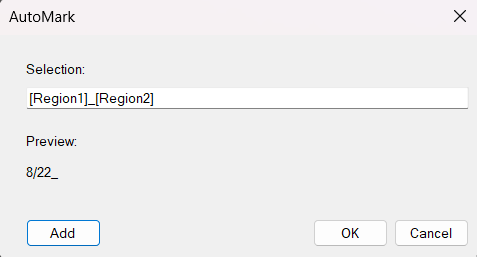
2) Create desired regions by selecting a rectangle. In your case I'd try "A101" first (and be generous with your margins. Your red rectangles look perfect). Then add another region for the sheet name. I like to put a separator between the regions like an underscore like this:
3) Select "OK" and it'll process. When it's complete you'll see the new labels in the thumbnails panel.
We need a script for this, so we can click one button and it will generate page labels and/or bookmarks based on a page region, especially when we're dealing with drawings that have the labels in the same place every time. It would be nice if it could differentiate between page sizes and use the specified locations accordingly.
@Heber Harker, so what you'd like (and makes sense to me) is something similar to a pre-defined print setting, but a pre-defined label page region setting and that could be defined and saved so that you'd just have to select "ARCH D size label configuration" (or whatever you named it) and it would automatically know what regions on the sheets to select to create the labels. I really like this idea, because you're right, I do that all the time and always have to select the same two areas. This would be great!
Yes, and this needs to be a script that we can assign to a button, even if we need to make a different script for each size of page or type of drawing, and have a button for each one.
I know this is not exactly your question, but this is something I've seen MCP (part of BB Max) handle really well. Claude can create these bookmarks, and it only takes a simple prompt
I deal with drawing packages that have different title blocks within the same package of drawings. I did testing with MCP and Claude and was really impressed that Claude and MCP were able to work with the different title blocks and produce a set of bookmarks and page labels. I usually have to do that manually and it takes a ton more time.