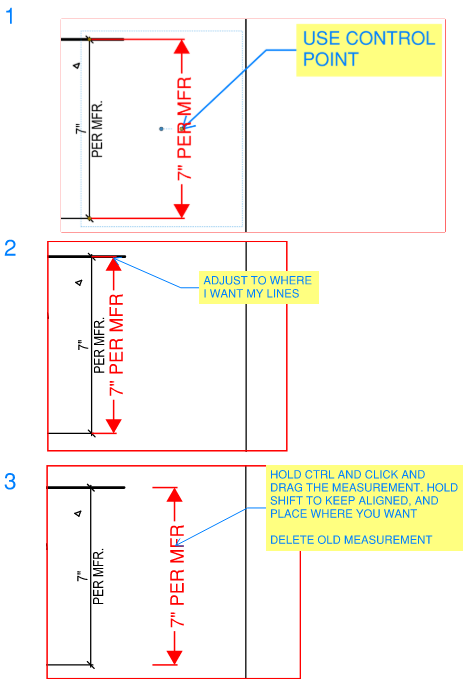
Is it possible to adjust the length of the lines at the end of a length measurement? I think this was possible in previous versions, but I can't find it anymore. See also the images below.
When you have the tool selected have a look at the Properties toolbar.
Here you should find the symbols that you are using for the start and end of the lines. Next to these symbols there are dropdown selection boxes - you can either use Auto or choose one of the % values.
That's true for the symbols. But I mean the lines that are perpendicular to the dimensions. They don't change. See also the lines in the images.
I don't think I've ever seen a way of changing the length of the perpendicular lines unfortunately.
Okay, thanks. And is there a way to remove these lines?
You could use the perimeter or polylength tools.
Thanks, that's a good alternative
If you select the measurement in question, you should see a control point (small circle) in the middle of the measurement. If you click and drag that point, it will adjust the length of the leader lines. Typically, I pull the measurement to get the leader lines were I want, and then just copy the dimension over to get it where I want it. If you hold control and click and drag the measurement, it will create a copy. Hold shift to keep it aligned and place it where you want. Delete the old measurement.
Please add the ability to allow some users to edit/delete other peoples comments. This can be controlled through permissions. At our organisation when reviewing drawings there is a review manager that consolidates comments before sending them back. This process occurs regardless of if we are using Bluebeam or another tool.…
Add folders for studio sessions to organize the list of recent Studio sessions. Some of our clients utilize one Studio session per deliverable on large projects that have multiple reviewers. It can be quite a task to find the one studio session for a smaller project amidst the rows and rows of studio sessions per…
With more people using bluebeam as a CAD/drawing program. It would be nice if bullet points/numbers points with auto text indent was a feature.
It would be helpful to have an autosave function for PDFs being used in Revu. Currently this does not exist and would be very beneficial.
This has been requested many many times in the past by many Revu users. WHY is there STILL no numbered/bulleted list function??
I'd like to create/insert a table into Bluebeam Revu that I can edit like any other markup.
Request is for the ability to group open PDFs into tabs, similar to the way that Microsoft Edge allows for web pages to be grouped together into tabs (Edge allows you to take a number of open websites and add them to a named / color-coded group tab. This allows for multiple websites to be open, but organized into group…