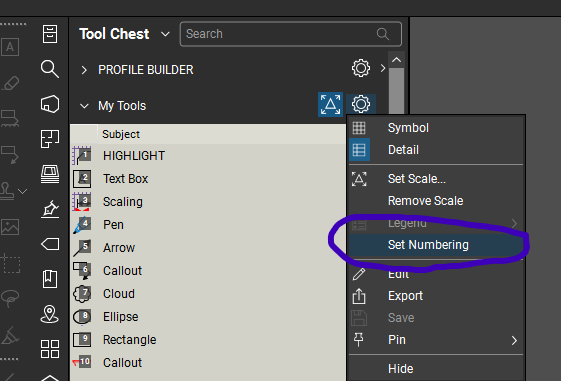
What are these numbers used for starting from 1 to how many mark-up tools you have, as per below 1-8?
it's not on any other mark-up tool in my Tool Chest
Good question @Tessi! These are "hot keys" for these tools. Striking the "1" key will activate the "FLEXPOP 150" tool without you having to click on the tool in your tool box.
Typically the numbered shortcuts are found on your "My Tools" tool chest, but you can set them on other tool chest by selecting the "Set Numbering" on the properties menu for a tool chest:
Hope this helps. 😎
Thanks David👍️. I thought it would be something simple like that.
Hi everyone! What is the experience with Revu on Mac via Parallels? I have been exclusively using in the past decade Revu on several iPads for marking off, measuring, take offs on the go but now as the iPad app gone and the new Cloud / Mobile replacement is still in the cooking I am forced to seek alternatives. As I have…
Can Bluebeam convert a .pptx file to a PDF, and if so, how?
How do I show a file path in a text box?
Hi, brand new user here. Just sat through several hours of tutorials, and I'm trying to determine how useful Bluebeam will be for tracking my daily as-builts on a road project. I'm one of the first inspectors using Bluebeam here. The problem I am having is using the Polyline Sketch-to-Scale. I cannot seem to edit a drawn…
知っている方が居たら教えていただきたいのですが、図面を翻訳する機能はありますでしょうか? よろしくお願いします。
I am trying to delete a previous session and entering a new one. I keep getting an internal server error. Does anyone know who to get a hold of to fix this?
i cannot see my properties panel. it only shows up if i change profiles. i cannot use shortcut key Alt-P to make it visible
When I am trying to search for keywords on a plan/document, it displays 0 results found. This is the first time I've had this problem. Does anyone know why that would be?
We are currently reviewing our licenses and find that we lack the necessary functionality to scale up or even maintain our current number of licenses. We would like to see functionality for creating and managing templates for control plans, commissioning protocols, checklists, and similar field documentation, with results…
I hope that is what the feature is called that I am referencing. I have used Blue Beam now for a couple years. I have always used the Line and Polyline tools when drawing things, especially overlays to buildings where I want to keep nice straight lines. In the past, I could select the tool, let's use Polyline: if I held…