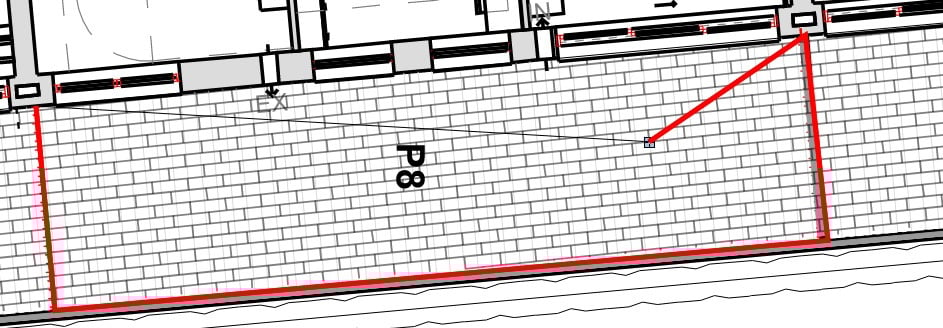
In Revu 21.8, when drawing an area markup, the settings for line opacity and thickness are previewed when conducting the mark up. This is blocking the view of the outline of the shape being measured. See the example below from Version 21.8:
In previous versions, the line was very thin, blue, and allowed the user to see points on the item being measured, allowing for high accuracy in the mark ups.(see below example from (version 21.5)
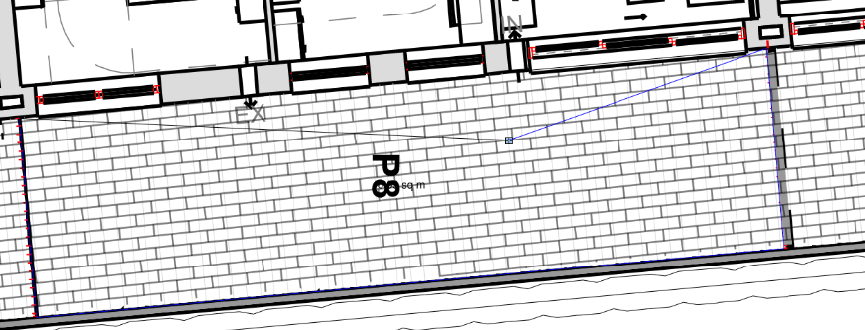
Is this an intended feature, or a known bug? In my opinion the red line in the latest update means it's harder to remain accurate when the line is blocking view.
I have also noticed that the line thickness can be adjusted prior to starting the mark up. However, even when setting this to 0.0pt, a minimum line thickness of 0.25pt will be previewed.