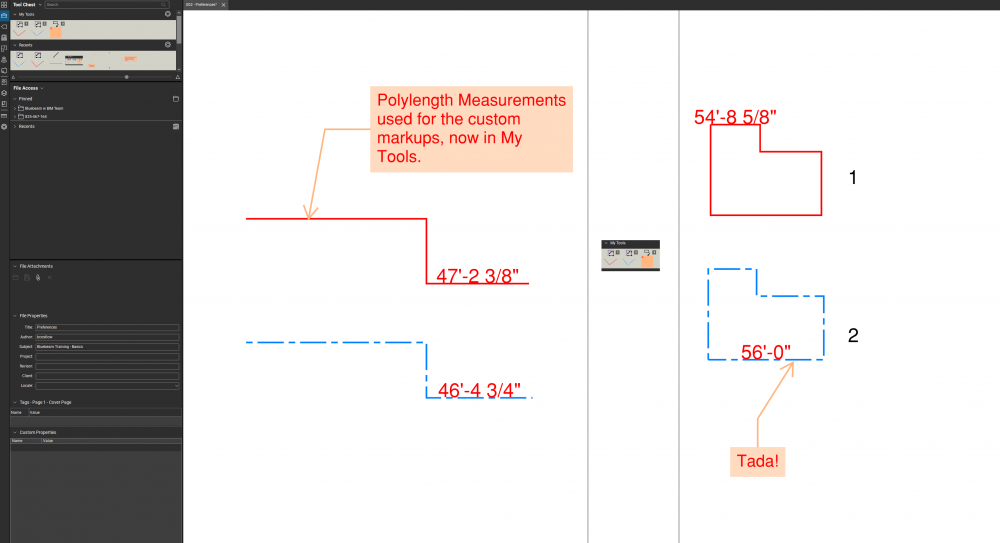
How do I create a markup shortcut that I created?
Correct. That is the DGL Tool Set. If you add a tool to the My Tools chest, any tool(s) there will be numbered. I believe that's the only way to give a shortcut like command to a custom markup. I know it limits the usefulness in some ways, but I hope that helps.
Could it be this setting keeping you from accessing the hotkeys?
It looks like you have applied some custom properties to an out of the box (OOTB) markup and want to re-use that markup with the setting you have applied. If you right click on that custom markup, near the bottom of that pop up menu you will see "Add to Tool Chest >".
Click that option and select which one you would like to add it to. I suggest choosing "My Tools" so you can build your collection of custom Bluebeam Tools.
Is that what you wanted to accomplish?
Thank you your response.
I have already done that but wanted to assign a shortcut key for that markup. Is that possible?
As far as I know, keyboard shortcuts can only be added to the tools and commands that are already listed in that settings window.
Perhaps someone else knows a way to add custom My Tools there with the Import button.
Thank you for the feedback.
If you move the markup to your My Tools chest, it creates a hotkey for it. You can use the number assigned to the tool as a "shortcut" key.
Edit: I apologize for the late response. I was out of town. I hope this helps though.
Good morning, thank you for the response. When I look in my tool chest, it doesn't have the number like yours. Please see bellow:
How do you activate these tools with the numbers?
The tools that I created and added to my tool set are not numbered, but I made them default the keyboard shortcuts works for them now. You can also reassign the shortcut key if you would like (make sure they are not correctly assigned). Click on Revu-keyboard shortcuts to get the screen bellow.
That is the pop-up window I went to to try assigning shortcuts to "My Tools" after seeing your post. I am still unclear on how you can assign shortcuts to custom tools in this interface.
But it looks like you have figured it out…
I hope this helps.
Add the tool to "My Tools" and then type the number of the tool's place in the set. So, the first tool is 1, second is 2, and so on. Sometimes I don't see the numbers, but the function still persists.
If utilizing the method that @Debora Leal outlined, you'll get the default settings of the markup tool you assigned the shortcut to. If that is adequate for your purposes then so be it. I try to keep common tool shortcuts dedicated to memory, but my markups I change the most throughout a project, I make sure to turn into a custom markup, sort it into a logical (to me) set and then put my favorites in My Tools and just use the hotkeys it assigns.
Just make sure to right-click the tool and change it to Properties Mode if you want to draw the shapes and such yourself. If you want it more like a stamp, then Drawing Mode should be good.
I hope that helped.
That is what I wanted to do, but it didn't work for me. I don't have the numbers next to the customized tools that I created, and number 1, 2, 3 doesn't work. I was not able to reassign a shortcut key for them either.
Just wondering what everyone is using in the field other than an IPad? Any Galaxy Tab, etc. users out there? If so, have you got any feedback?
I have plotted two drawings from AutoCAD to PDF (each a single page). When I open them separately in Bluebeam, their layers show up as expected. When I insert the second page into the same PDF as the first page, the layers are no longer showing for the second page. How do I get the layers to come along with the PDF when I…
Did a quick search and found nothing. Maybe I am missing it, but is there a way to customize right click menu? Thanks in advance…
New Year new problems😶 we are trying to setup our field iPads to use BlueBeam and are having issues. BB Support indicate the iPad app is no longer supported as of Dec 2025 and to use the web portal app.bluebeam.com, when we enter the web portal address in the iPad browser it directs us to download the mobile app. What is…
What is this icon in Studio Session? How do I address it? Clear it?:
is Bluebeam going to add more tools to the cloud based app? such as stamp, measure/dimension and count.
My autofill descriptions list for the Count Subject has grown too big. When I begin to type in the Subject field of the "Count Measurement Properties" I get a list that is too big. I would like to clear this suggestion list. They are not "Subjects" that I have used in current PDF I am working on. They are the combined…
Hello, I received an email from Bluebeam stating that I was a part of their beta testing community. I have explored the new features, such as offset and markup conversion, but I haven't found the AI prompt capability. Is this available with BluebeamMax beta? I have paid subscriptions for Bluebeam (premium) and Claude.…
Hi all, I've recently been following the hype about working out of Bluebeam Sets as I'm looking for ways to streamline our workflow. I did have a question about viewing markups particularly when you are working with individual extracted drawing files as that seems like it gives you the best performance when working off of…
We are using the Revu version from 2015. We have yellow imbedded links in our PDFs that point to other PDFs. The only way these links work is if we have the folder where they are stored turned onto IE Mode. We want to get away from using IE Mode with Edge. Can someone help guide me through the process?