Build connections with Bluebeamers around the world, discover what’s new, and make your voice heard.
Is it possible to adjust the length of the lines at the end of a length measurement? I think this was possible in previous versions, but I can't find it anymore. See also the images below.
When you have the tool selected have a look at the Properties toolbar.
Here you should find the symbols that you are using for the start and end of the lines. Next to these symbols there are dropdown selection boxes - you can either use Auto or choose one of the % values.
That's true for the symbols. But I mean the lines that are perpendicular to the dimensions. They don't change. See also the lines in the images.
I don't think I've ever seen a way of changing the length of the perpendicular lines unfortunately.
Okay, thanks. And is there a way to remove these lines?
You could use the perimeter or polylength tools.
Thanks, that's a good alternative
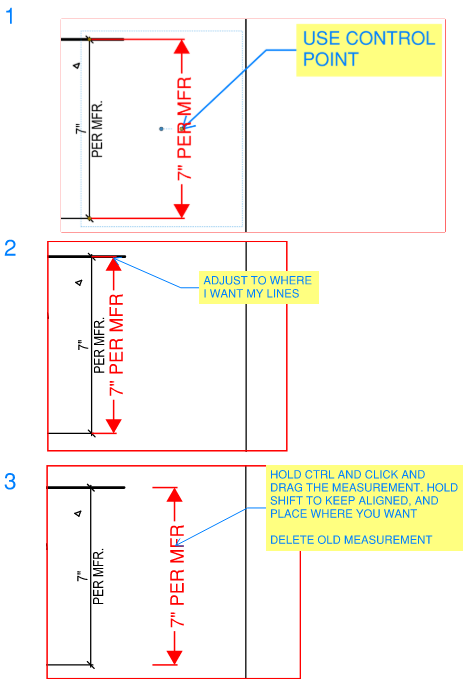
If you select the measurement in question, you should see a control point (small circle) in the middle of the measurement. If you click and drag that point, it will adjust the length of the leader lines. Typically, I pull the measurement to get the leader lines were I want, and then just copy the dimension over to get it where I want it. If you hold control and click and drag the measurement, it will create a copy. Hold shift to keep it aligned and place it where you want. Delete the old measurement.