Build connections with Bluebeamers around the world, discover what’s new, and make your voice heard.
I don't see a way to resume a measurement once it's entered. There are times when I need to add more area to an existing area measurement or even extend a polyline by resuming the measurement. Count is the only one I see with a resume option.
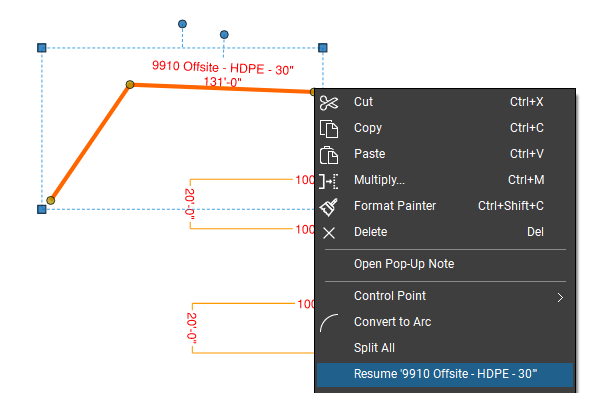
@DerekCFor Poly Length or Perimeter measurements you should be able to right click on either end point and select "resume" (NOTE that you need to click on the end control point, not along the line).
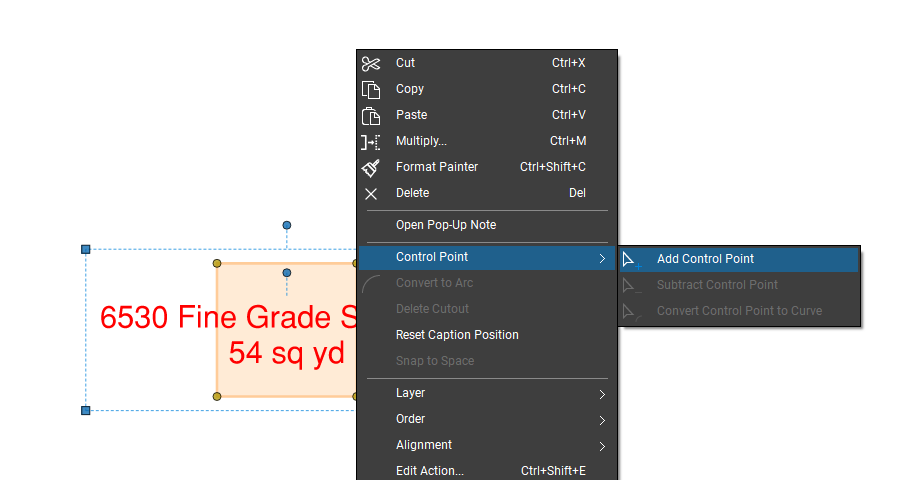
Areas are a bit trickier, but can still be modified. Select the area markup that you would like to add to. Right click on the side that you want to modify, click "control point" and then "add control point". You can then drag that new control point to where you need it. Repeat as necessary to capture the additional area.
FWIW I try to break complex areas into smaller sections as inevitably I end up need to adjust limits of work and this saves me from having to split larger areas into smaller ones.
Hope this helps. 😎
Thanks for the tips Dave. The single control points comes in handy if just a small change but on larger changes like a new parking lot or extending the lot it's just too cumbersome to do it that way. Hopefully they add this in the future, most take off programs I use have this feature, I am really shocked as to what is lacking in this software considering how powerful it is.
Completely understand @DerekC! I'm hoping that they will add some sort of "merge areas" feature at some point.
FWIW I have shortcut buttons for adding and deleting control points on my toolbar:
This makes adding points a bit more efficient as this keeps the add (or subtract) points "active" so I can add a bunch of points and then drag them to where I need them relatively quickly.
To build on @David Cutler's response, in lieu of right clicking to add a control point or using the button you can also use keyboard shortcuts. Hover your mouse over the edge of an area markup and hold SHIFT, you will see a Plus button appear next to the cursor indicating "Add Control Point". Holding SHIFT and hovering over an existing control point you will see a Minus appear indicating "Remove Control Point". Holding CTRL and hovering over an existing Control point you will see an Arc appear indicating "Arc Segment".