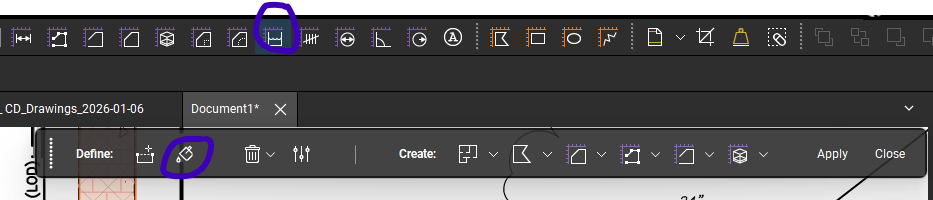
I used to use the "paint can" fill option all the time when organizing my PDF's, and that icon disappeared a couple years ago. Did it get changed or modified? Is there an alternative that will do a similar task?
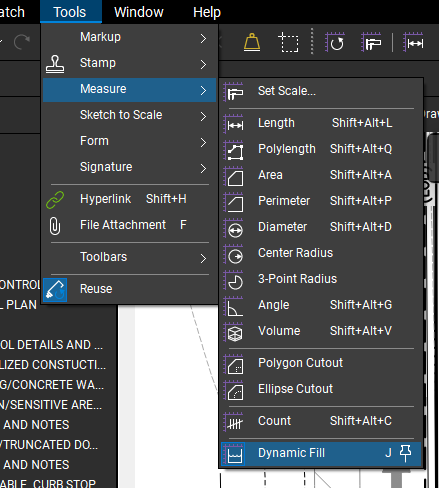
Thank you for the additional information @T-Berbs. Have you tried using "Dynamic Fill"? You have to have a "Complete" subscription to use this feature, but this might get you close to what you are looking for. If you have good quality drawings to work from Dynamic Fill can be a huge timesaver when measuring or color coding items with curves. I'm an estimator in the Civil Site Construction space. Dynamic Fill (with a good set of drawings) works well for parking lot and curb takeoffs.
Depending upon how you have your interface setup you can launch it from a toolbar or from the Tools menu:
Hope this helps. š
@t-berbs could you provide some additional insight into how you are using color to organize your PDFs?
David, Thanks for reaching out, so I am in the HVAC industry and we receive PDF's from engineers with their plan for heating and cooling buildings. I add color to the ducts and piping to refer to differentiate between the air systems (Supply, return, exhaust etc) , material changes, piping systems and so on. The "paint can" icon used to let me quickly go through and color these systems for me to then follow while I design my systems. That feature went away, and I don't have an alternative that is as quick.
Thanks for the information. The Dynamic Fill button is grayed out on my system, it must not be part of my company's subscription.
That could be the case @T-Berbs. You can check your subscription plan by clicking on your user name in the upper right corner of your screen. Might be a good time to lean on IT to upgrade your planā¦
This morning one of my coworkers opened a file that he has been performing a material takeoff in to find the original PDF content missing. All of his markups are present, but the background PDF content is not visible. He is running Revu 21.8 I opened the file on my machine (Running Revu 21.6) and have the same issue. Iā¦
Is there any way to have a custom column property show up in a label?
Do markups on an offline iPad "time out" if the device doesn't connect to Studio in a certain amount of time? One of our employees was at a jobsite using Bluebeam on an iPad to add markups to a Studio Session (offline, no Wifi connection). A couple days later when the iPad was back online, the markups were gone. Is thisā¦
Hi, been using Revu for a few months every day of the work week all day. I've been struggling with the legend. I set up the legend as i wanted it got everything working and put it in a toolchest. The first day it worked great, but every day since I have to keep setting all of my toolchests to use this legend as theā¦
Hi All, I need to send a share link of the Revised Arch. sheets in my Set to the printer. BB AI chatbot pointed me to Sets/Publish/Combine then select the option to "include only revised sheets". Sadly this option doesn't exist in my Combine window. Can anyone tell me where to find it or if there is another way to createā¦
I am opening Revu 20.3 extreme. It opens however it does not allow me to perform any functions. I have uninstalled and reinstalled it. Same issue. When i open revu 20.3, the window that says recover unsaved changes opens in the middle of the software screen. The item that it refers to was deleted from my pc. I also deletedā¦
I recently build a testing report for my field representatives that includes a javascript for some basic calculations. I wanted the form as easy as possible for my older field reps so I wrote a straightforward javascript that will automatically highlight, make bold, and show the result they are after. This form worksā¦
Besteht die Mƶglichkeit, wenn ich die DeckenflƤche markiere /ausmesse, dass gleichzeitig der Umfang angezeigt wird. Es ist doch erheblich aufweniger, wenn ich zuerst die DeckenflƤche markiere und die m2 erhalte und dann nochmals die gleiche DeckenflƤche abklicke um den Umfang des Randprofiles zu erhalten. Das kƶnnte manā¦
How do I export all pdfs into one? I am going in a field visit tomorrow and I am trying to use a revu project in the field.