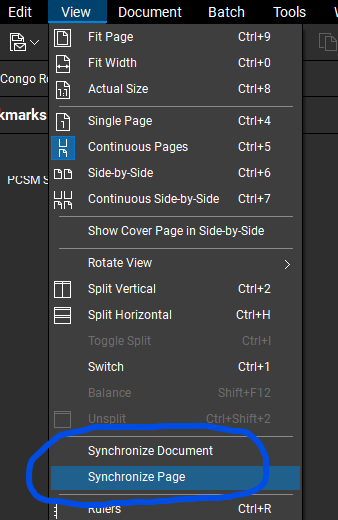
When I zoom on one tab the other tab is adjusted as well. I am using my mouse scroll to do this. I also just updated to the latest version of Bluebeam. Is there a fix for this? Is anyone else experiencing this?
@jstebbins sounds as if your views are "Synchronized". You can adjust the setting in the "View" dropdown menu.
Not sure how updating would have changed this setting, unless the default is set to synchronize out of the box now…
Hope this helps. 😎

When I add digital signatures, the window doesn't close after I'm done. It doesn't freeze. I cannot change locations on the document. It will stay open and let me repeat the exact process but never closes. I have to go to Task Manager and close Revu. Any thoughts? Thanks,
I recently upgraded my bluebeam from Core to complete. now my interface is on view mode, i have tried to comeback to markup mode but can not fine the markup mode please i need assistance.
After the recent update, my search function does not work any more. I have tried my files including the ones I have successfully searched words in before the update. Is this a bug? How can it be fixed?
Just wondering what everyone is using in the field other than an IPad? Any Galaxy Tab, etc. users out there? If so, have you got any feedback?
I have plotted two drawings from AutoCAD to PDF (each a single page). When I open them separately in Bluebeam, their layers show up as expected. When I insert the second page into the same PDF as the first page, the layers are no longer showing for the second page. How do I get the layers to come along with the PDF when I…
Did a quick search and found nothing. Maybe I am missing it, but is there a way to customize right click menu? Thanks in advance…
New Year new problems😶 we are trying to setup our field iPads to use BlueBeam and are having issues. BB Support indicate the iPad app is no longer supported as of Dec 2025 and to use the web portal app.bluebeam.com, when we enter the web portal address in the iPad browser it directs us to download the mobile app. What is…
What is this icon in Studio Session? How do I address it? Clear it?:
is Bluebeam going to add more tools to the cloud based app? such as stamp, measure/dimension and count.
My autofill descriptions list for the Count Subject has grown too big. When I begin to type in the Subject field of the "Count Measurement Properties" I get a list that is too big. I would like to clear this suggestion list. They are not "Subjects" that I have used in current PDF I am working on. They are the combined…