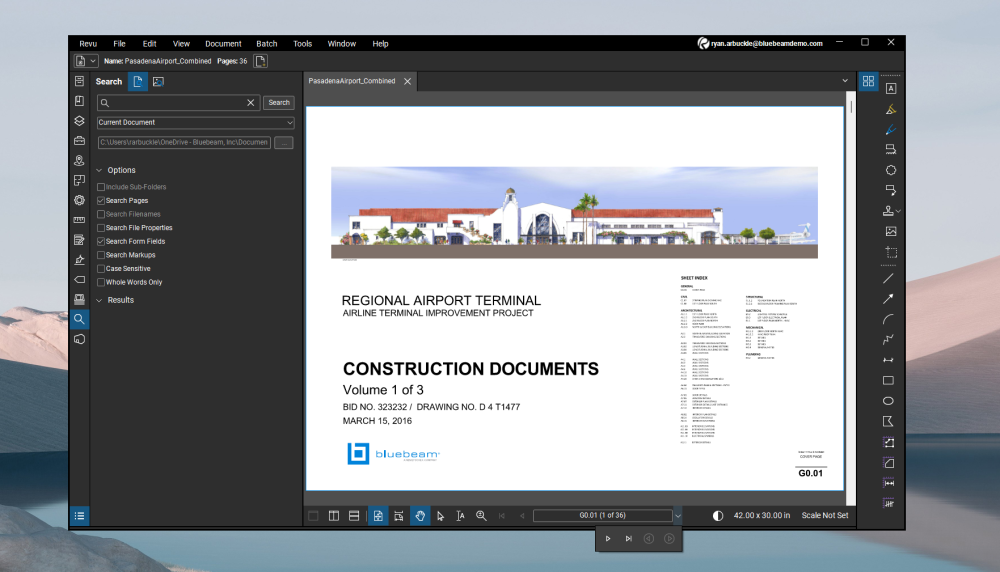
Where did the default page navigation arrows go? How do we get Revu to go back to the default page navigation interface? What did we do to make this change to the Revu UI?
Default UI
Current UI
Sometimes those navigation arrows get hidden in the dropdown when Revu is not full screen. Having a panel open or two can cause that as well.
Dispaly resolution or scaling can impact that along with the side panels like Ryan mentioned.
Thank you. We're also going to try and do the reset, to see if that restores the default navigation UI.
I'm with Ken and Ryan. Most likely its your screen resolution or your side panels.
There was an error rendering this rich post.
Is there any consideration for Bluebeam to have a feature to reassign markups? I know it is simple to change the properties to a different markup but then you get into the game of changing the color and everything else. Wouldn't it be simplified if you could just reassign it to a takeoff, you've already utilized or…
Recently, I've been experiencing and issue in that when I use my hotkeys for the typewriter or text box, they don't work. I used to be able to then go click the icon on the bar and I'd then be able to drop a textbox or get the typewriter cursor to appear, but now that doesn't work either. I just tried uninstalling and…
I am not able to choose different colors for my layers when I am overlaying more than 8 layers together. All I am seeing is the graded color palatte in revu v21 rather than the default one where we can customize the colors based on the RGB values. Has anyone faced this issue before? Is there any workaround for this to…
How do I ensure my session allows for plan review markups? I cannot sort out how to enable one of my sessions to have both the review and plan review tab.
Small Biz and we have BB Revu 20 still in our conference rooms because it does not require sign-in. I tried putting Revu 21 in one conference room and had it signed in with it's own account, but then there were server side issues and then login was required again. Users were confused and entered their own login for…
Some of the BB marked up PDFs I receive have shading and "draw order" out of whack to the point that I cannot read what's below the block. All of the items should come in like the "12' APPLES" unit, in orange. Any thoughts? The preferred "Order" would be with the shading at the base level and the pasted fixture block above.
we have installed the software and tried to login with "name_example.com" Account using "Bluebeam Australia Region"., But it is not allowing to login. Showing the error like below snip. But., we tried to login with "Bluebeam United States Region" and it allowed login, but the Plan is showing as "unassigned" like below…
Hello!! I have been using Bluebeam for a decent while, and anything I have trouble with I can usually sort out on my own, but I am stumped. We have a set of plans, all of which are images with a peach-coloured background. To save on ink, I need to change them to grayscale, ideally. Please see the attached screenshot. It…
On Windows, some PDF previews appear in my folders sidebar while others do not. It seems like the ones I created show a preview, but the externally generated ones don't. Is there a setting I can change to make all PDFs show a preview?