Learn how to manage your notification preferences through your profile.
Why Notification Preferences Matter
Notification preferences ensure you receive updates on content you're interested in, either in-app or via email. Managing your notification preferences helps you stay informed about the content that matters most to you, while avoiding unnecessary alerts.
Managing Your Preferences
As a Vanilla community member, you'll engage with a lot of content. The Notification Preferences page lets you control which popup and email notifications you receive. This ensures you never miss important updates and can choose to opt out of notifications you don't need.
Accessing the Notification Preferences Page
There are several ways to access your notification preferences.
Navigation Bar
Click on the bell icon, then Notification preferences

Profile
- Click your Profile > Account & Privacy Settings.

- Select Notification Preferences from the list.

Setting Your Preferences
Notifications come in two forms: Popup (bell icon) and Email (envelope icon). Popup notifications appear in real-time within the community, while email notifications are sent to your inbox.
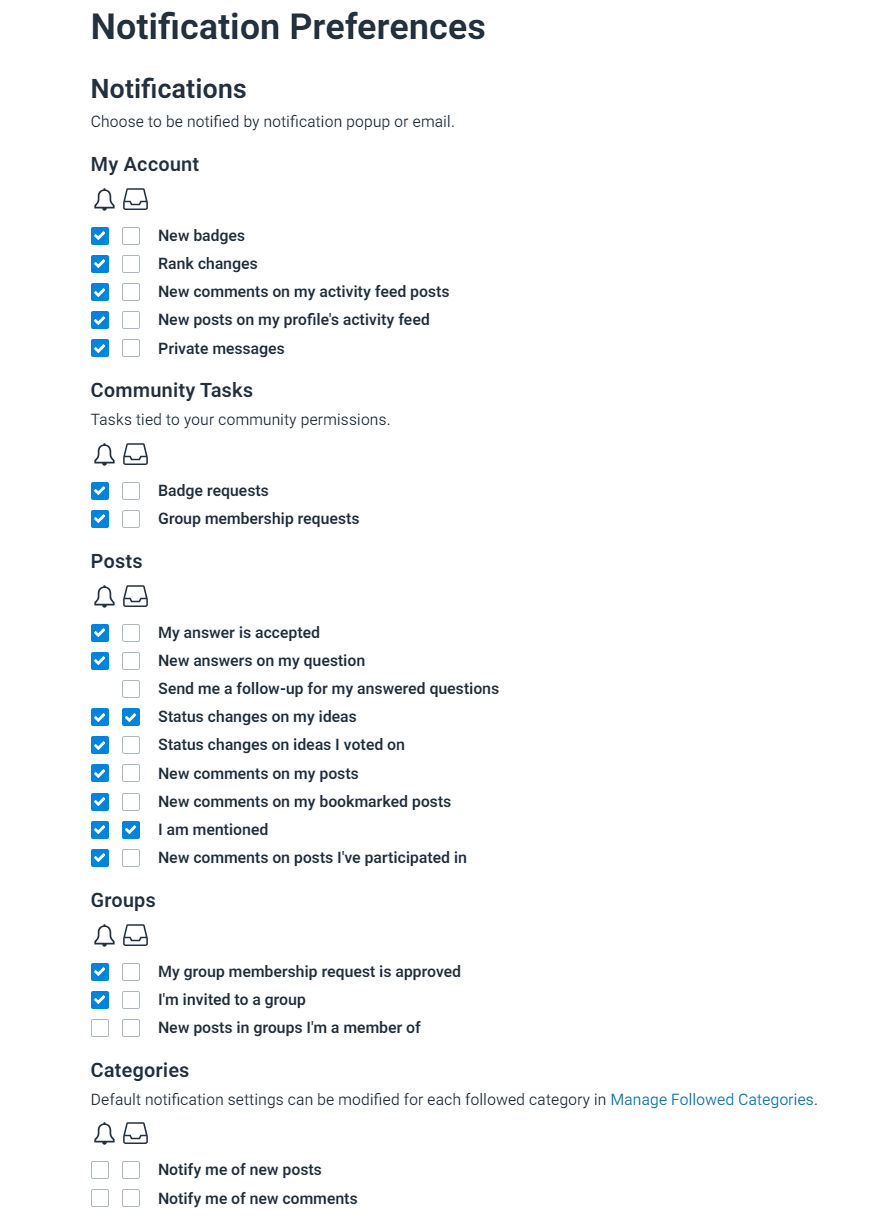
Categories on the Notification Preferences Page
- Followed Posts: Control notifications for posts you’ve interacted with.
- My Account: Manage notifications related to your profile, like ranks and badges.
- Groups: Receive updates on group memberships and content if the Groups and Events addon is enabled.
- Community Task Notifications: Manage notifications for tasks related to your community permissions.
- Followed Categories: Choose notifications for content in categories you follow.
Changes are saved automatically as you check or uncheck boxes.
Unsubscribe Options
All notification emails include an Unsubscribe link, allowing users to opt out of specific notifications. Users can also manage their notification preferences from their profile.

Please also check out our Welcome Guide for other FAQs.