Before BB Revue was reinstalled on my machine, I used to be able to fix text to the text box. I have lost that command and don't know how to get it back.
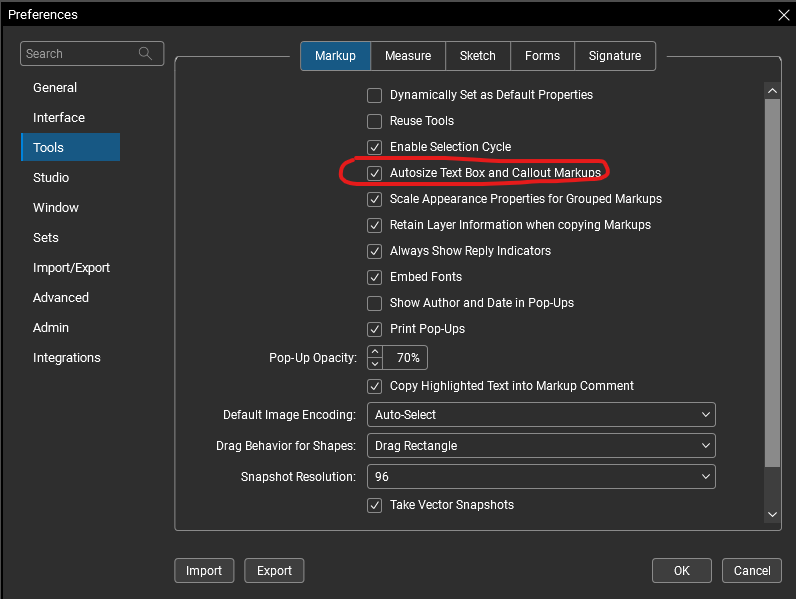
"Alt+Z" is the quickest way when you're in the text editing mode, but you can also change a setting in your preferences to do this automatically.
I can't seem to find how to set this autosize text button to show either @KGlaser, but I may have found a workaround!
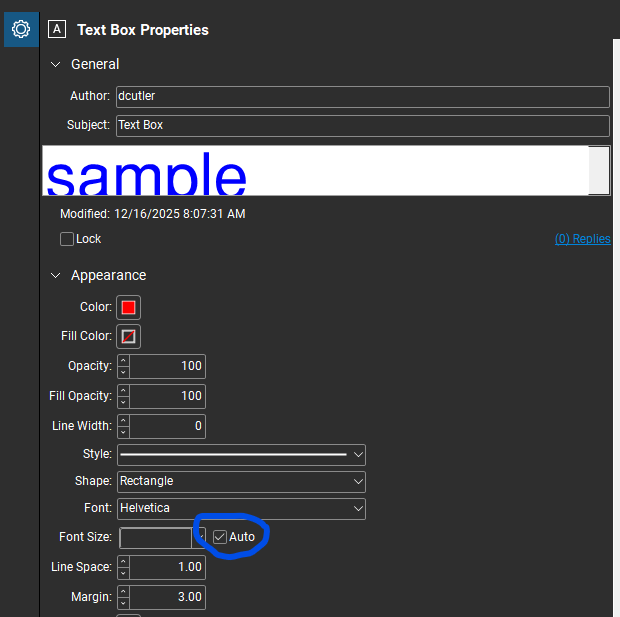
You can set the text box to autosize in the text box properties pane:
You can then set this as your default - or create a custom "autosize textbox tool" in your tool chest. Maybe even place it into your "my tools" chest and assign a number to it for easy 1 click access.
Hope this helps. 😎
@KGlaser are you looking to make the text box fit the text or are you looking to change the font size for the text so that it fits the text box that you have drawn?
it took me a while to find the screen you are showing above, and I clicked the box, but there isn't any change. There used to be a symbol within the Font toolbar that I could click to automatically scale the font to match the box size. Can you help me find that?
Thanks!
text to fit the box.
There used to be a symbol within the Font toolbar that I could click to automatically scale the font to match the box size. Can you help me find that?
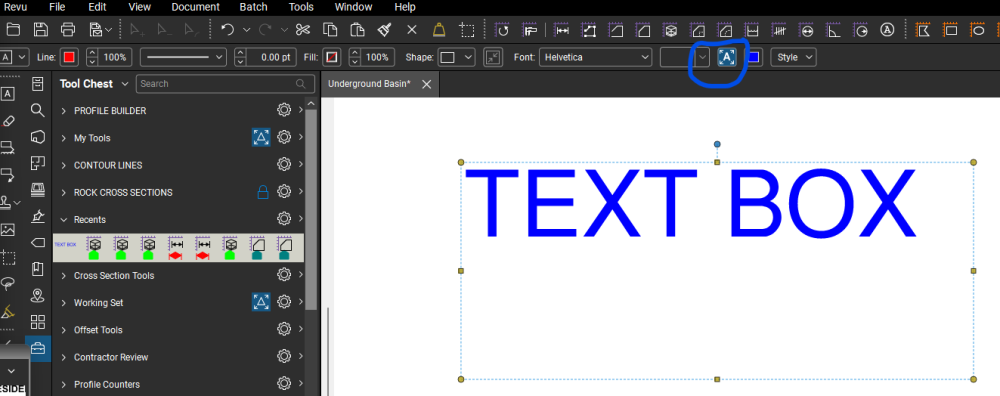
I think I found what you are looking for @KGlaser, but I'm not finding how to edit the tool bar to add/subtract it - it already shows when I select a text box:
Once "Autosize Text" is selected the font changes as the box is resized.
Can anyone help @KGlaser on how to make this option available to them?
that's the box i am talking about! I can't find it.
This actually didn't solve my biggest issue. see conversation with @David Cutler
@David Cutler that will do in a pinch- thanks!!
@David Cutler
I have the answer to this problem now!!
I no longer had the PROPERTIES TOOLBAR checked. That solved many of the frustrating issues I was having.
Thankyou for posting the ultimate solution @KGlaser! Glad to hear that you were able to find it. 😎

We are using the Revu version from 2015. We have yellow imbedded links in our PDFs that point to other PDFs. The only way these links work is if we have the folder where they are stored turned onto IE Mode. We want to get away from using IE Mode with Edge. Can someone help guide me through the process?
If I open a PDF that Does not have editable fields and I want to create one I would normally click the area then type and then click to the next area I want a text field. For some reason when I click an area to add a text field it allows me to enter text as normal, but once I click off of that area whether it is on a…
I’m using Bluebeam Revu 21.8 – Complete and trying to streamline navigation in a drawing set. My goal is to auto-create hyperlinks from callouts (e.g. 5/A401) that jump directly to the referenced detail viewport, not just to the destination sheet as a whole. I understand that Bluebeam can create page-to-page links, but I’m…
Kicking off the new year Bluebeam has eliminated the iOS version of the Revu app, so now we are stuck with cloud. Cloud seems to have less than 25% of the functions we used on the app, and are now faced with cancelling several subscriptions due to the lack of tools. Primarily we use the Toolset in the field, on tablets. We…
How can I get this brown help suggestion box to stop popping up when I go to hyperlink? Every time I switch from document to document it lowers the page, and when I click to the next it moves the windows around just enough that I have to realign where I was hyperlinking to. Its very distracting and slows down work. I have…
Any time I create something in Bluebeam and open in AI it does not show anything. Anyway to make this happen.
On older version: When the measurement scale wasn’t set on a PDF, adding a measurement markup used to trigger a prompt asking me to set the scale first. In the newer version of Bluebeam, that prompt no longer appears, and the measurement markup disappears. Now, I have to set the measurement scale before adding any…
We just bought Revu 21 licenses for our office, and we have one user who has been using it for some time on Revu 20 Standard. I've been reading through the documentation and I believe I understand what our options are but wanted to make sure. I've got our licenses distributed through the admin portal for Revu 21, and am…
Windows 11, Revu 21.08.0.13613 I have a mouse with the forward and back buttons. I use LogiOptions+ to have the buttons do a keyboard shortcut only when using Bluebeam. Specifically, I make them do CTRL+Left/Right to go to the previous/next page of the pdf instead of the default of next/last view. This worked fine for the…
I'm trying to establish a workflow for adding multiple engineers' signatures and seals to different sheets of a single pdf drawing package. Example: I have three sections to my plan set which is required to be submitted as a single PDF. Civil, Structural, Electrical. Each of the three sections must be sealed by a different…