Build connections with Bluebeamers around the world, discover what’s new, and make your voice heard.
It would be very beneficial to have the two enhancements below:
@Steve Tissier - Structures, if I’m understanding your request correctly, both of these enhancements are already available in the software.
#1 has actually been there all along. If you select a markup, then hold Ctrl while dragging, it will place a copy of that markup. If you hold Shift+Ctrl, the copy will stay aligned in a straight line.
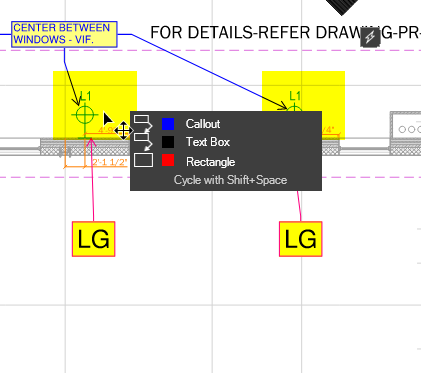
#2 was introduced more recently. When you hover over a markup and press Shift, you can select that specific markup, even when it’s grouped closely with others (see screenshot below).
@Shaya Birnbaum, neither of those are what I was referring to.
I made a video showing this, but doesn't seem to be allowed to be uploaded here.
@Steve Tissier - Structures, thanks for clarifying. I think that I understand.
You are asking about expanding an active selection set, either by using the right-click drag lasso to add multiple markups at once or by cycling through nearby markups with Shift to add a specific one to the selection.
That is different from what I mentioned earlier.
Since uploads are not supported here, you might want to post your video to YouTube and share the link. If the video has no sound, you could also convert it into a GIF and upload it directly so everyone can see what you are describing.
curious as to what you are trying to accomplish by doing this?
We often have sheets with lots of markups on them when going through QC. It would be nice to right click drag lasso different groups of markups in order to apply a certain status to them. Then do the same thing for others. We run into this situation a lot.
I agree, sometimes my markups can't be filtered out since they are cosmetic rather than data based, i.e., ductwork coloring and sequences. Have had many times where I needed to shift certain parts of the ductwork or even room outlines to fit and would have been handy to be able to, for example, select the perimeter items all at once or multiple cutout sections.
Can layers or just filtering in the markup list be used ti help with some of this? I have tools such as a scaffolding lift height template which I place on drawings so I can then quickly markup the main scaffold lifts, adaptions, etc.. All of these 'template' type tools are assigned to a layer(s) that I can turn off once I've measured the relevant items.