Build connections with Bluebeamers around the world, discover what’s new, and make your voice heard.
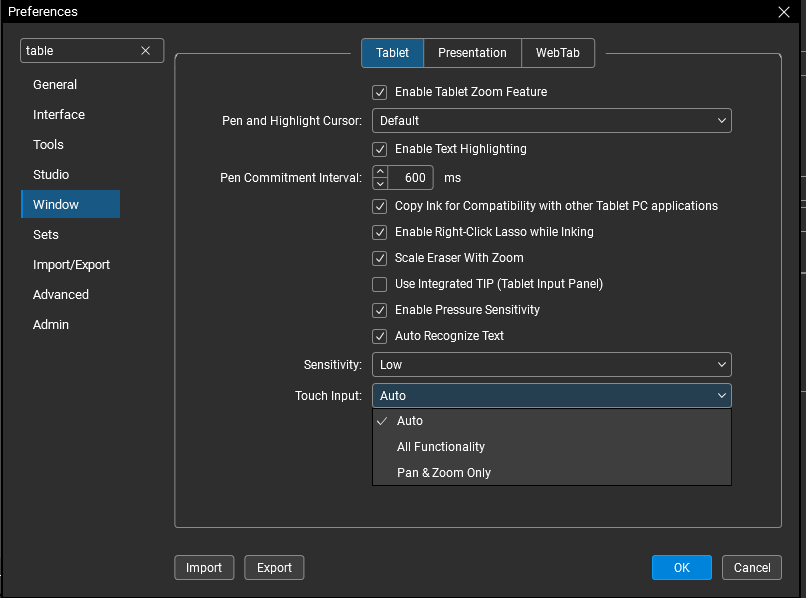
Haven't messed with these too much, but have byou tried messing with some of these settings?
I think @Joseph Sluterbeck and @mark madison have experience with Surface laptops. Maybe they can help.
The other thing you may want to do is set up a Custom Toolbar for your Surface. There are a couple of things you may want to specifically add to this toolbar like an Escape Key, of a Shift Key maybe? Make sure your preferences are set up accordingly as IS
I tried all 3 settings and there is no change
I have a custom toolbar, but I can't figure out how to have 3 different free hand pen colors on the toolbar. I have to manually change the color each time
those would need to be in a Toolchest, not a ToolBar
That is not intuitive at all.
I have to have a full screen toolbar and tool chest open at the same time on a Windows Surface when in full screen mode?
I expected the full screen toolbar to be the only toolbar taking up screen real estate.
It seems like Bluebeam for Windows isn't optimized much for touch screen tablets.
We just tested this on a Surface Pro and we are able to pinch to zoom. Can you provide any more detail? This might be worth opening a support ticket for because pinch to zoom should be working.
Here is a short video depicting the problem.
20250818_131137