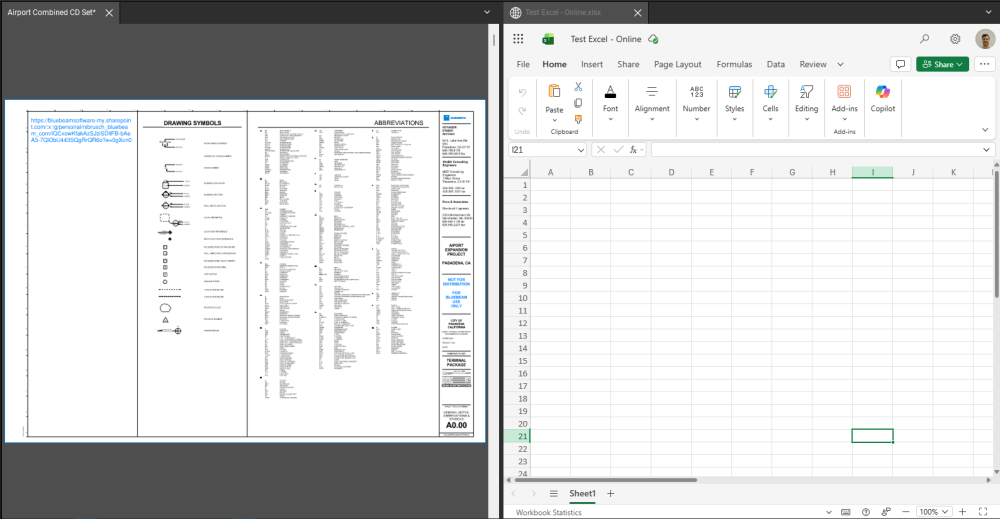
Could you please let me know if there is a way to split the window first and then open a spreadsheet or a Word file in one of those windows parallel to the pdf file?
Not in Revu specifically, but on a Windows machine, you can download Microsoft PowerToys and configure the "Fancy Zones" utility. This will give you pre/custom configured windows to snap your Revu, Word, or Excel to quickly. It's free as well! I really like this for having a widescreen monitor, it gives me multiple options dependent on my workflow.
Microsoft PowerToys - Windows Utilities for Power Users | Microsoft Learn
If you are OK with using the web version of excel, you could insert a hyperlink into one of your documents with a link to the excel web document. When you click on this link, it will open up a tab in Revu with the excel file. Note, to split the view, you must use the split view tool on the pdf tab. You can then manipulate the tabs like normal.
Thank you Jason !!. I will try that PowerToys feature too.
You can only split the Revu screen with PDF's
However, Windows 11 allows this. Click <Start> and Rt. Arrow and the current program will open on the right hand side of the screen. Click <Start> and Left Arrow to put another program on the left hand side of the screen.
Sounds like the perfect excuse to get a second monitor 😁
I all the time use Windows key + Right and Left arrow to move around the different application windows between two monitors. I guess that is what you mentioned above. Thank you for your input !!
sneaky.
Be warned though, the web version is still a bit behind the desktop version. Not all functions will be available to you. VBA won't work on the web version as well.
Thank you.

CAn we export form Bluebeam to DXF. If not any way we can export the lines to be used in anlaysis software
Some of the consultant drawings I receive have a protected scale and when taking measurement and areas it doesn`t show up in the markup list. Also the drawing is blued out. Is there away around this Many thanks Murray
I've been trying to find anything related to this, but all I see is default tool 'settings' but I want to change the tool, not settings of the tool. The default selected now is the pan tool but my most used tool is the select text tool and when I open a new PDF or have multiple opened and then I close one, Revu will change…
Hello, I have used the Grab feature for years and it is one of my most frequently used tools. Recently, however, when I grab from one drawing and paste into another, the file size increases from around 1 MB to 2 GB. If I switch off “Take Vector Snapshots”, it resolves the file size issue and the drawing size hardly…
Hey, Is anyone know why Revu is crashing. I open it uplaod plans start measuring and it just crashes. I have uninstalled and re-installed. I have a very time sensitive project that I am doing and need it now and support is over 24hrs away. Any help be much appreciated. Thank you
When working on a file, Bluebeam will freeze then shut down. It's been happening quite frequently. Why is this happening?
As part of preliminary estimating for roadway projects I have created a custom toolbox for area, length and count items. I can change the color. Is there a way to change the icon to something like SW for sidewalk area? I have the measuring tools set up with custom labels and layers to facilitate review and quantity total…
Hello, Can I import Chets Tool Items from Excel. I've a list of items in Excel (number, description, m, m2, m3 of Pc) I've to measure. Can I import it to Tool Chest. Thanks.
Good afternoon, I want to create a Tool-Chest component in "Tool Chest" that automatically numbers, e.g., W001, W002, W003, W004, ... and measures the area. It should place this on the plan-view with number W001 and the area. And then also place this number W001 in the Marksup list so that the link between a specific wall…
Hello! Today when uploading a capture from a screenshot, the image sets at 3D, does anyone know how to make the capture images to set at 2D? Thanks in advance