Hello Everyone,
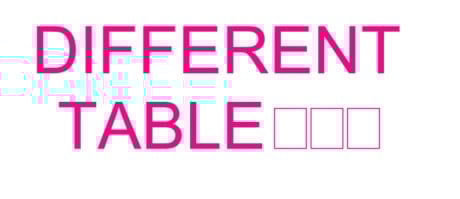
I am looking for help because some of the symbols, while using the "Arial" font, turn into squares. What could be the issue?
Thank you in advance!
@JoseQuezada - we have dealt with this issue for years as well. The easiest solution is to not use Arial. Apparently Windows and Arial (especially Bold or other variations) don't get along very well sometimes. We have changed all of our markup tools to default to Helvetica to avoid this issue as much as possible.
Option two, which is not as reliable, is to create a preset under Reduce File Size to drop embedded fonts. Click on Edit next to Custom Preset and uncheck all the options except on the Fonts tab, check the Drop Embedded box. Save it as something like "Drop Embedded Fonts" and then you'll have it available anytime you need it again. It's not a full proof way to fix the text, but it's something else you can try - especially if you need to use a font like Arial that usually acts up, especially with special characters.
You can see which fonts are a part of the file under Document Properties > Fonts
Here's a related help article:
https://support.bluebeam.com/revu/troubleshooting/characters-change-or-disappear.html
This has been an issue for several editions of Revu. I have switched to Helvetica and not had any issues.
Thank you for the response. That's great to know
I have usually found that it is specific to the PDF. Chances are that there is a corrupted embedded font. Could possibly fix by re-creating the doc.
Thank you!
Yes, it appears that this could be the issue. Is there a way to see the corrupted font?
Unfortunately, it is not my PDF, and I cannot regenerate it.
For now, I will have to switch to a new font.
Thank you Rebecca, That makes sense. I will make sure to embed the fonts to minimize issues
Touchdown! Worked changing font. Thank you.