Hello Everyone,
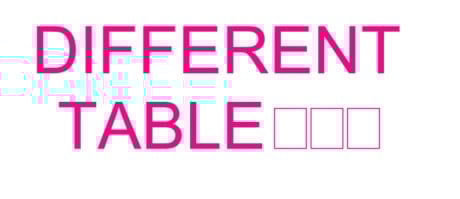
I am looking for help because some of the symbols, while using the "Arial" font, turn into squares. What could be the issue?
Thank you in advance!
@JoseQuezada - we have dealt with this issue for years as well. The easiest solution is to not use Arial. Apparently Windows and Arial (especially Bold or other variations) don't get along very well sometimes. We have changed all of our markup tools to default to Helvetica to avoid this issue as much as possible.
Option two, which is not as reliable, is to create a preset under Reduce File Size to drop embedded fonts. Click on Edit next to Custom Preset and uncheck all the options except on the Fonts tab, check the Drop Embedded box. Save it as something like "Drop Embedded Fonts" and then you'll have it available anytime you need it again. It's not a full proof way to fix the text, but it's something else you can try - especially if you need to use a font like Arial that usually acts up, especially with special characters.
You can see which fonts are a part of the file under Document Properties > Fonts
Here's a related help article:
https://support.bluebeam.com/revu/troubleshooting/characters-change-or-disappear.html
This has been an issue for several editions of Revu. I have switched to Helvetica and not had any issues.
Thank you for the response. That's great to know
I have usually found that it is specific to the PDF. Chances are that there is a corrupted embedded font. Could possibly fix by re-creating the doc.
Thank you!
Yes, it appears that this could be the issue. Is there a way to see the corrupted font?
Unfortunately, it is not my PDF, and I cannot regenerate it.
For now, I will have to switch to a new font.
Thank you Rebecca, That makes sense. I will make sure to embed the fonts to minimize issues
Touchdown! Worked changing font. Thank you.
Hi, I was wondering if it is possible to overlay markup across pages in a way that when a change is made on one page, all the other pages update. This would be exceptionally useful when planning routes of pipes etc between floors. (Bluebeam Revu) Any help would be much appreciated!
Hi All, I am trying to add revised sheets to my Set(.bex) using Batch Slip Sheet. The problem is when I hit the Match Pages button I am receiving error messages (See images below). I believe the problem is coming from BB including previously revised sheets in the Current Files column of the Match Pages window. Am I doing…
When I zoom on one tab the other tab is adjusted as well. I am using my mouse scroll to do this. I also just updated to the latest version of Bluebeam. Is there a fix for this? Is anyone else experiencing this?
When taking off quantities in lengths i prefer to use m rather than mm. Is there a way to set this as the default for all my take offs
Hallo, ich bräuchte Hilfe bzgl. der Polygonlängen - Messung in Revu 21. Ich habe eine automatisierte Baugrubenkalkulation in Excel aufgestellt, in der ich anhand der Polygonfläche des Gebäudegrundrisses die Volumina und Flächen ermittelt bekomme. Aktuell tippe ich die Koordinaten in Excel händisch ein, welche ich von PDF…
Hi everyone, I’m running into an issue on a new laptop and I’m wondering if anyone else has experienced this. I have an active Bluebeam Basics subscription, but when I sign into Bluebeam on my new laptop, I get a message saying my free trial has expired and that I need to upgrade to keep using the software. The same…
Hello! I am trying to get curves to draw when using the polyline and polygon markup tools and they show up like they are going to be drawn as a curve but then when I click along they 'revert' as a straight line. To clarify, when using either markup tool, I hold 'Ctrl' then click and drag to create the curve/arc that I want…
Several Municipalities are requesting the PDF's be Unlocked so they can mark-up and add their stamps. Much to Engineers sealed drawings, they do not want them unlocked. I tried scanning and sending them, but they are still locked. Can a blank mark-up layer be added before or after password protecting the drawing?
Hi everyone, I’m working with a new license that doesn’t seem to work. Everything is greyed out, and I can’t select any functions in the different documents. Is there something I forgot to activate or similar? I’ve paid for the “Core” version.
Hi Everyone, I have been back and forth all morning trying to reset my scale sizing. it is showing my measurements in inches and ft but I need them in m2. When I then go to remeasure it just goes back to the original inches and ft. Could some one please tell me how to reset this fully as i have never seen this before.
