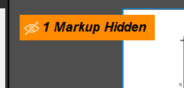
I have hidden my measurements, or mark-ups, how do I get access to it?
It sounds like you might have some interface elements turned off? A screen shot might help understand better. Something you can try is to change your profile to a different one then back to the one you want. This can sometime "restart" the interface. Go to Revu (top left) > Profiles > pick any other profile that isn't checked currently
Then go back and choose the one that was checked previously. For example Revu > Profiles > Revu
Ken, tight at the bottom left it says Open PDF to mark up, how do I do it?
please help me to show the lengths of each measured item
Top left corner of the PDF will be a small toolbar to reference how many items you have hidden. Click it to unhide.
What is the pdf?, my tool chest is currently open and the drawings to the right of it. I used to have an arrow I think, to move the measurements wither to the bottom or under the options to scroll between pages, etc. Both of these are missing
THank I managed via google, it's in Windows - Panels - mark-ups
You can also right click on any existing panel icon the go to Show and it will list the menu of all the panels. If one doesn't have the blue shading behind it, that one is not currently displayed.
Glad you were able to figure it out.