is there a way to create page labels for a drawing set (ie 60-100+ pages), and then also add page numbering for sequential order (ie # prefix in front of custom page label)? it seems you can do one or the other, but not both?
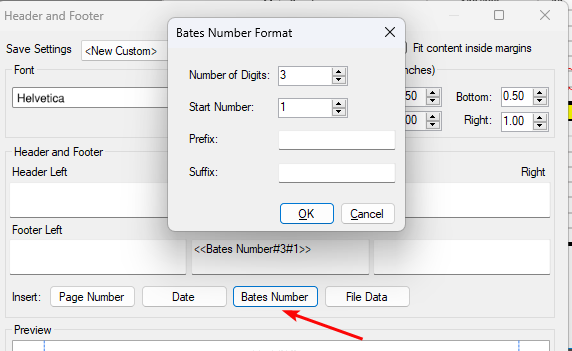
@Shelby, you can do it in Headers and Footers with "Bates Number".
Just use the following settings:Number of Digits: 3 Start number: 1
@Shelby Here's how I handle it: First, add the page numbers using the "Header and Footer" tool. Once that's done, use the "Create Page Labels" feature with the "Page Region" option. Include the page number field from the header/footer when setting up the labels. There may be another way to handle it, and Id love to hear!
looking for way to add prefix, such as 001, 002, 003 within page label (sequentially, starting at any number), so not sure header/footer option will work for that numbering format

Why in this new version the command "offset" is disabled? It saved me a lot of time. How can I enable it again? My Revu plan is complete
Hello! 2-part question: 1. Is there a method, after marking up plans, that I can Batch Change my scaled Dimensions from Ft-IN to IN? As I export to a workbook,I need to convert dimensions for formula use 2. Is there a better formatting or setup for markups, knowing that I will be exporting the data for take-offs? Thank you
Is there a way to take a markup and group it with a hyperlink and save it to the toolchest? I use the same graphic and hyperlink many times within a drawing set. Right now, I have been creating a new hyperlink pointing to a URL everytime. It would be a lot more efficient if I could create a markup that was grouped with…
Area tool does not work my Bluebeam that I have on my PC with a Snapdragon processor. It works just fine on my other Windows laptop that has an Intel processor. Does anyone facing a similar issue? All other measurement tools work fine along with the Calibrate tool to scale the drawings. I noted the processor since Bluebeam…
Sorry bu this is a newbie question. I have just set up some custom columns in a markup list but I can't seem to enter data into them.
Hello, I’m using bluebeam to plot electrical schematics for projects, I’m just wondering what people are using is there anywhere I can download some? Thanks in advance
Recently my default tools in Bluebeam were randomly removed from my Tool Chest — specifically my most commonly used custom tool set. I’ve rebooted several times with no change. When I open the Tool Chest, my custom tool set is not even listed among the available tool sets. At the same time, there are several tool sets…
We’re currently experiencing problems where some users are unable to log in. After downloading and installing the latest version (21.9), the application opens and proceeds to the sign-in process, but we encounter the following behavior: Revu launches and a white pop-up window appears labeled “login.bluebeam.com” with a…
Why I cannot move the dimension line to fit the dashed line? If I move, the dimension line always goes to pass it ( go to the black line above). This also happens when I use line.
I was happily using the new Offset tool (shortcut 'O') a few weeks ago. I went to use it again today and it seems to be grayed out. Whether I have a markup selected or not, the tool does not seem to work. Tried restarting system, no luck. Was this feature disabled in the latest update? I'm running 21.9, Core Subscription.…