Build connections with Bluebeamers around the world, discover what’s new, and make your voice heard.
I would like to be able to create a toolset for "Scope of Work". The best way I see to do this is to use the highlighter tool and fill in the "subject" field for the specific scope. Then I highlight the text for that scope and it adds the text to the markup list. I would then be able to export the markup list and send out to subs or write scope. This works great except you can't save the custom highlight tool to a tool set for some reason meaning you would have to reinvent the wheel everytime.
Do you have an example of what you are looking to see?
Are you highlighting original content in the pdf or markups that someone made?
Either way, I suggest setting up statuses for each of the disciplines/trades. That way, you can set the status of the highlight or other markup to "plumbing" or "OFOI" or "by others." These can then easily be filtered. You can even set colors for each status so it is visually obvious who is responsible.
https://support.bluebeam.com/online-help/revu20/Content/RevuHelp/Menus/Window/Panels/Markups/Custom-Status--T.htm
Currently the "copy highlighted text into markup list" is a computer/user specific setting that is not associated with the highlighter tool and is not a setting that can be saved in the toolbox. I think the ask here is to allow that setting to be associated with a tool on the toolbox, which would be a nice addition. I'm always struggling with turning that setting on/off, along with freehand vs text highlighting - so if you do it for copy text into markup, it would be nice to also allow the freehand vs text highlighting setting to also be associated.
I concur with the original post. I want to use different highlights to note different tasks.
Example: I want to highlight spec/drawing notes for the rpogramming technician in blue. I want to highlight spec/drawing notes for the installer in green. Same with notes for the PM in red.
If I could save the different highlights with their subject as "TECH NOTE," "INSTALLER NOTE," etc, then it is easier to run a report that pulls just those. Having to go in each time to change the color and subject is tedious.
Is there any way to save a highlight as a custom tool?
Appears you have simplified the ask here @WolfWallace - add the ability to add highlighters to the tool chest. Frankly I was surprised that you couldn't…
I do have a bit of a work around that might work for you and @JLARGENT…
Format painter is available for use on the highlighter tool. You could have a "standard highlights" PDF established with your colors off to the side. As you ID a "TECH NOTE" you would highlight it with the standard highlighter and then use the format painter to assign the correct color. Next it gets interesting…
If you display the "color" column in the markups list you can sort by the color of the highlights. Next select all of the highlights with the color assigned to the TECH NOTE highlight. With all of them selected you can change all of the subjects at once.
Again, not ideal, but it might get the job done.
Hope this helps. 😎
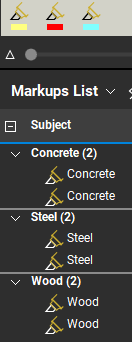
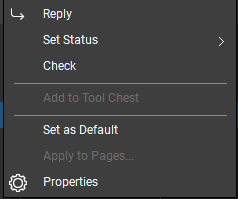
Works just fine for me. Do this all the time. Set the subject on the highligher, right click and save it to the toolbox. Close BB to save that setting and reopen it.
Thank you for showing this is possible @Josh Gebelein. Somehow I missed this… 😎
What version are you using? In 21.7, right clicking on a highlight does not allow for adding to the toolchest.
21.7 Complete
Freehand highlight, not highlight on text.
I've got to say folks this is an amazing collaboration here! I don't think you will find this type of sequence in anyone's documentation!
So, to summarize the process:
Hope this helps many people in the future! 😎